
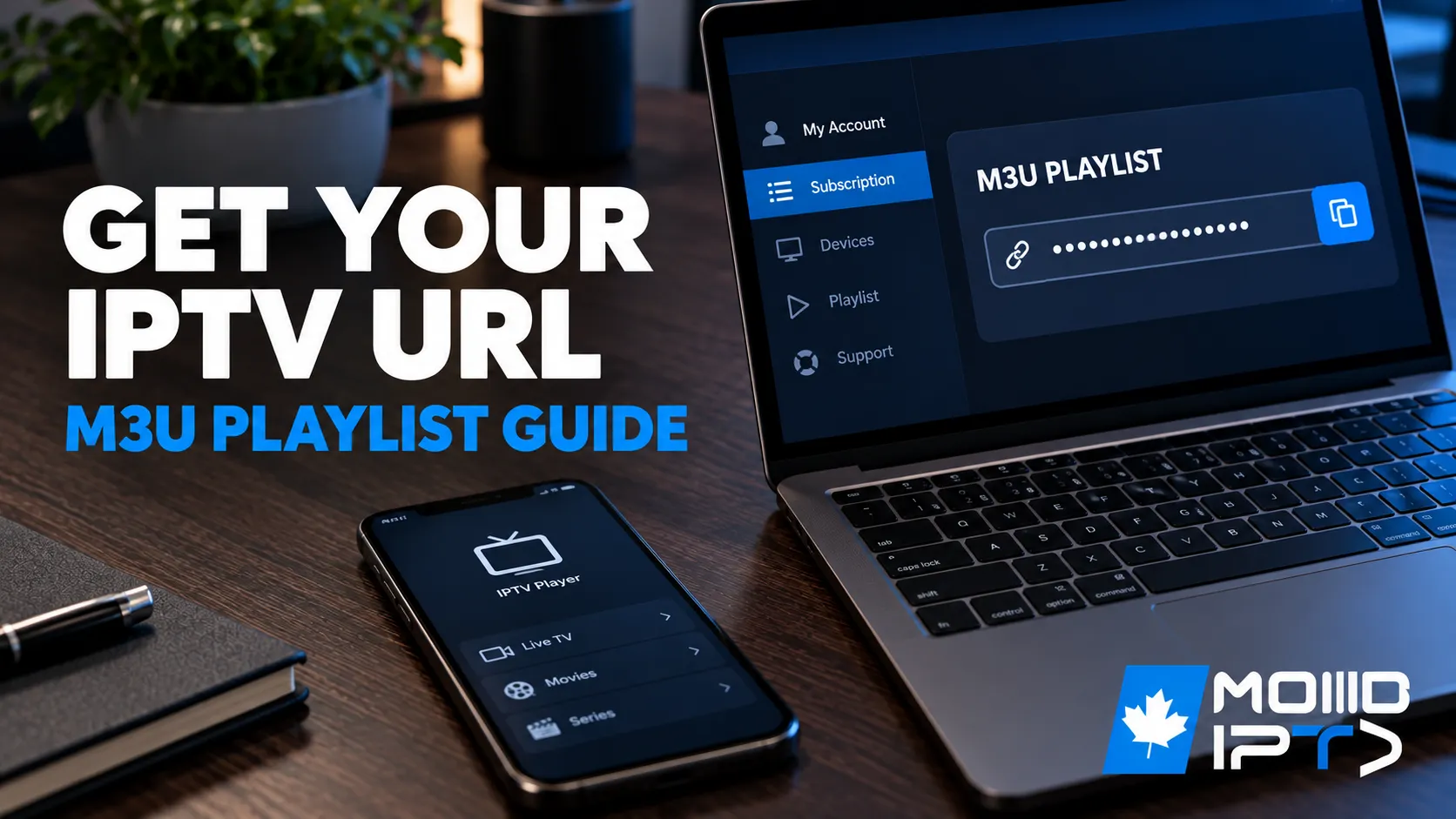
You get a URL for IPTV from a real IPTV Canada provider account: after subscribing, the provider gives you a personal M3U playlist link plus a TV guide (EPG) link, both tied to your username, device limits, and an expiration date, usually found in your account dashboard. If your provider uses Xtream Codes, you don’t get one long link; you enter three things instead: server address, username, and password.
Under the hood, an IPTV URL is a standardized link that directs your media player to a streaming source, functioning as both an access credential and a directory pointer. This guide explains what these URLs are, the difference between M3U, M3U8, and Xtream Codes, where legitimate URLs come from, how to load them into every popular app, and how to spot the unsafe sources you should never touch.
1. What an IPTV URL Is and How It Works
When you input an IPTV URL into compatible software like TiviMate or VLC, the player parses the response to extract channel streams, metadata, and EPG data, all delivered over standard HTTP/HTTPS.
- An M3U playlist contains structured entries with stream endpoints, channel names, and logo references. Your player reads these sequentially and builds a navigable channel list.
- An Xtream Codes URL works differently: it authenticates via username/password parameters, then returns playlist data through API calls rather than one static file.
Either way, the URL is your key and your map at once: it proves your access and tells your device exactly where to find and decode the right video streams. That’s why the link is personal, why it expires with your IPTV subscription, and why guarding it matters.
2. M3U or M3U8: Which Format Do You Need?
The distinction centres on encoding and stream-protocol compatibility:
- M3U8 files use UTF-8 encoding, which matters when your playlist contains non-ASCII characters or references HLS manifests with .ts segments. For adaptive-bitrate streams, M3U8 is the standards-compliant choice.
- M3U remains the common default, and most players (TiviMate, IPTV Smarters, VLC) accept both formats interchangeably. Only HLS-only applications strictly require M3U8 manifests for proper segment parsing.
One rule worth remembering: changing a file extension doesn’t convert the underlying stream. The playlist only points to endpoints; the actual content must match the referenced format. In practice, use whichever your provider supplies and don’t rename anything. Our guide to what M3U is shows what’s inside the file.
3. M3U Playlist vs. Xtream Codes: How Access Differs
Beyond the technical format, the two systems handle your access and updates differently:
- M3U playlist: one single link that loads your channels (and sometimes EPG), which your app refreshes periodically. Simple and universal, but if the provider rotates the link or its security token, it can suddenly stop working until you paste the new one.
- Xtream Codes: server address + username + password. The API approach surfaces richer details (channel groups, movie posters, on-demand libraries) and updates parts of the list without reloading everything. The trade-off: if your login is shared or leaked, many people can use it at once, slowing or flagging your service.
Most quality providers supply both; use Xtream Codes where your app supports it and keep the M3U link as the universal fallback.
4. Where IPTV URLs Actually Come From
An “IPTV URL” is not one standard public link; it’s generated by systems that control who can watch, on which device, and for how long:
| Source Type | What It Is | How It Works | Reliability |
|---|---|---|---|
| Official IPTV services | Legal platforms with user accounts | Create personal M3U and EPG links tied to your account | High and stable |
| TV channels & streaming networks | Broadcasters and media companies | Protected streaming links for their own apps and approved partners | High but restricted |
| Unofficial restreaming services | Services repackaging many channels | Bundle channels into one big playlist link, often without rights | Unstable and risky |
On the free side, open-source repositories host curated public M3U playlists, and some legal ad-supported platforms distribute public M3U8 URLs, legitimate but limited, with mostly niche channels and no support. Paid providers deliver your URL through private links or API credentials linked to your subscription, and most will issue a temporary one through an IPTV free trial so you can test it first. The pattern is consistent: the more official the source, the more stable the URL.
5. How to Get Your URL From Your Provider Account
If you use a legal IPTV service, your own account is the source of truth: links there are generated per user (sometimes per device), which makes them the most reliable:
- Log in to your account and open the “Playlists,” “Apps,” or dashboard section to copy your playlist URL and EPG URL.
- Check the link’s conditions: how long it’s valid, how many devices can use it, and whether it’s locked to one device.
- Test the links in an IPTV app or player to confirm they load correctly.
- If they fail, contact support with your username, device ID, and the time you tried; those three details let them diagnose in one exchange.
Can’t find a dashboard? Your welcome email has the same details, and your provider’s help pages document the exact link format they use. New to this? Our guide on getting an IPTV subscription explains what arrives after you sign up.
6. Don’t Forget the EPG URL
The stream URL is only half the setup. The EPG URL (usually XMLTV-formatted guide data) synchronizes channel schedules with your playlist, turning a raw channel list into a real TV guide with now-playing and upcoming-program information.
Providers typically supply it alongside the playlist link; some public repositories offer guide data too. Paste both URLs into your app’s settings (playlist in the playlist field, EPG in the EPG/XMLTV field), set the guide to refresh every 12–24 hours, and apply a time-shift offset if listings run a few hours off your Canadian time zone. Our EPG guide covers what to do when the guide stays empty.
7. How to Add Your IPTV URL in Popular Apps
Same goal everywhere: let the app load channels and guide data, then refresh them automatically. For more players by device, see our best free IPTV apps.
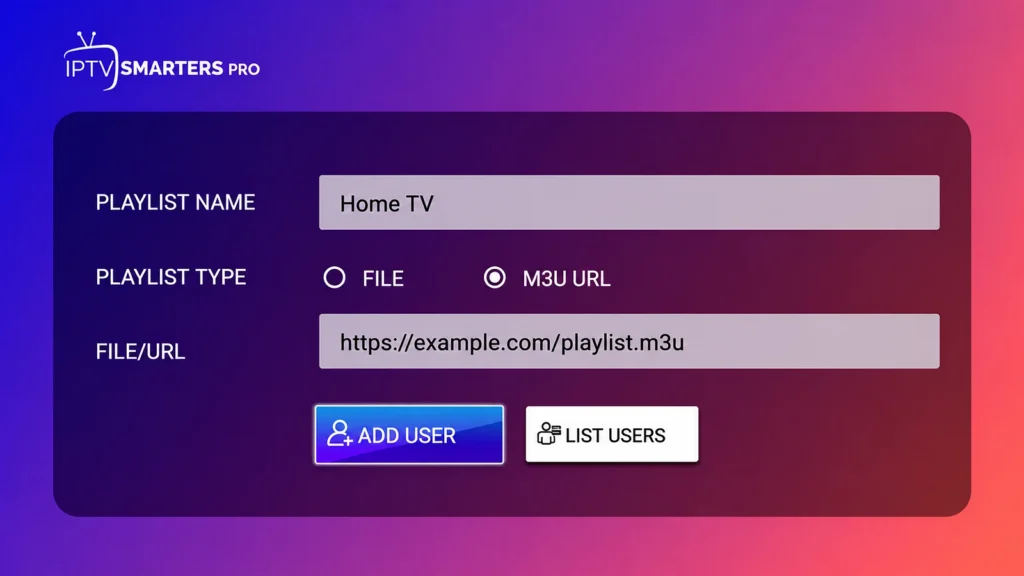
IPTV Smarters Pro: choose Login with Xtream Codes API (Player API on iPhone and Apple TV) for a server address, username and password, or Load Your Playlist or File/URL (M3U URL on Samsung and Apple devices) for the long link. Name the profile clearly and select Add User. Our Smarters login guide covers each device.
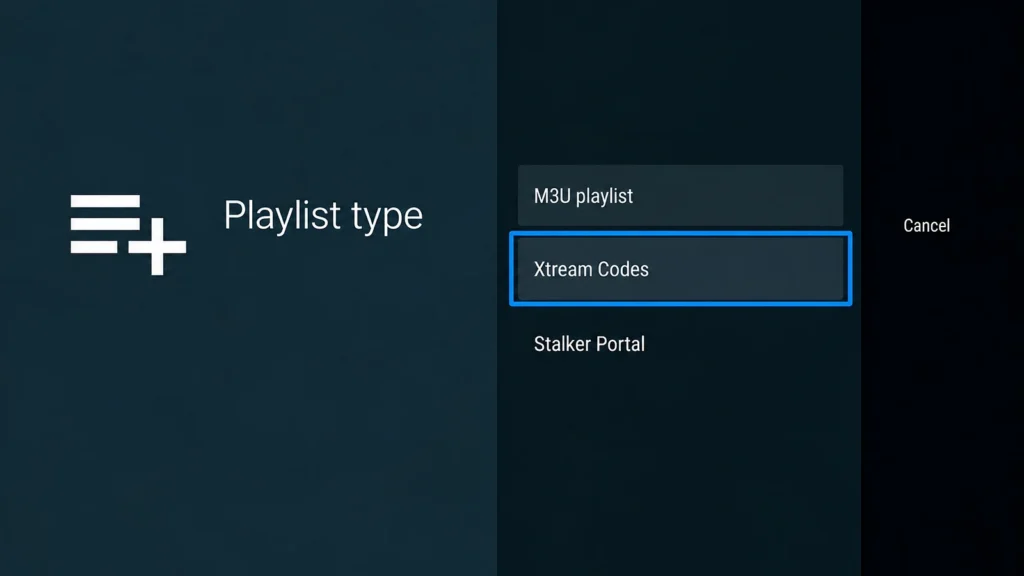
TiviMate: select Add Playlist, choose Xtream Codes or M3U playlist, enter your details, and add the XMLTV EPG URL if you used M3U. Our TiviMate guide has every screen.
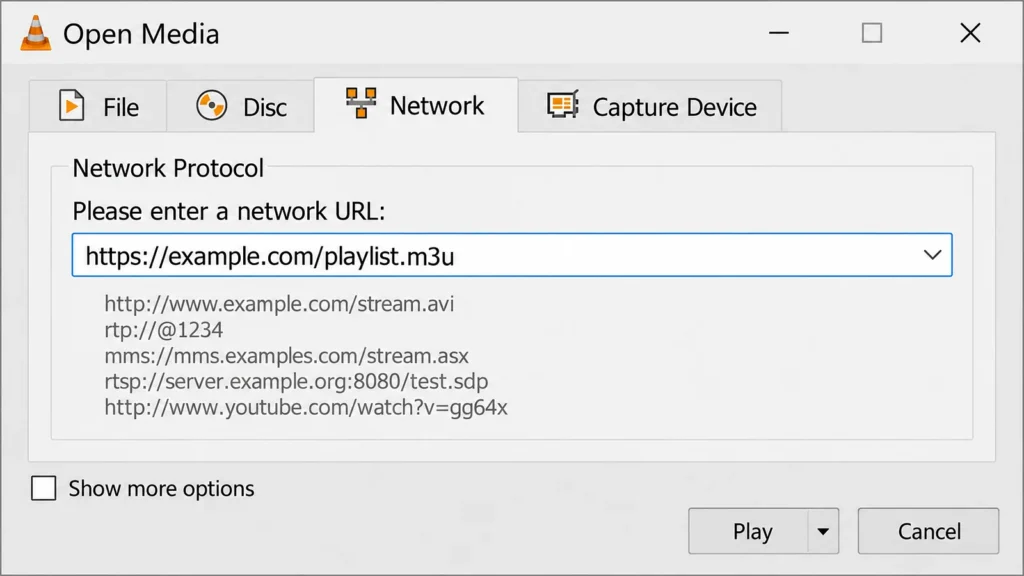
VLC (computer): Media → Open Network Stream, paste the URL, click Play; use View → Playlist to browse channels.
Kodi: install PVR IPTV Simple Client, set Location to Remote path (Internet address), paste your M3U link as the M3U playlist URL, and restart Kodi. Our Kodi guide shows each step.
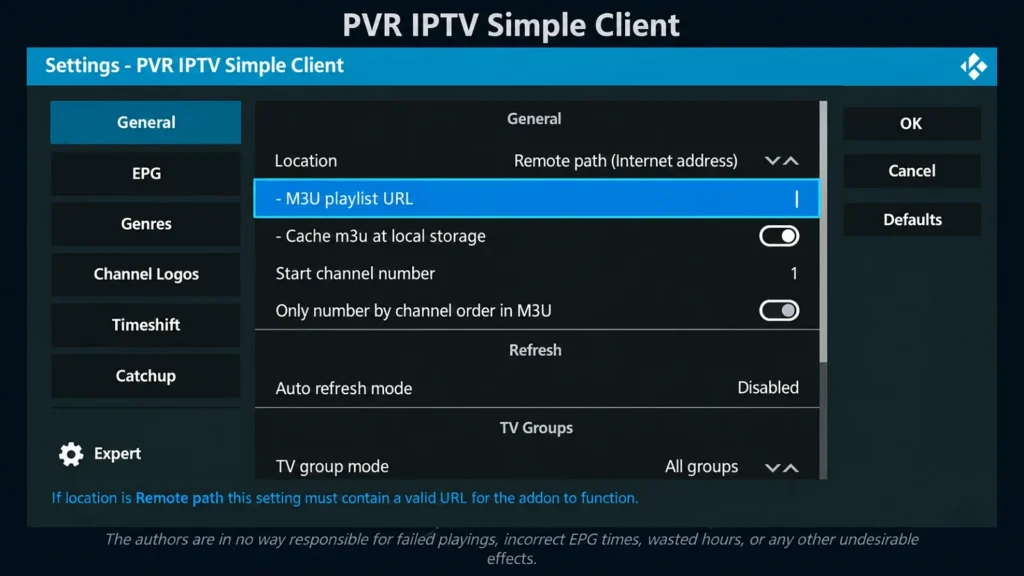
Enter details carefully: copy and paste, never retype, and keep a stable connection of at least 25 Mbps for HD streams.
8. IPTV URL Not Working? Fixes That Actually Help
Rule out configuration errors before assuming the provider is down:
- Verify the URL format: it should end in .m3u or .m3u8 with no stray characters or trailing spaces.
- Test the URL in a browser. A 404 or timeout confirms a server-side problem beyond your control, so contact support. If the browser responds, the issue is local.
- Check your subscription status: an expired plan returns nothing.
- Confirm bandwidth: 25 Mbps minimum for reliable HD.
- Clear the app’s cached data and reload the playlist: this resolves most parsing failures in Smarters and similar apps.
- Match the format to the app: some applications require Xtream Codes rather than M3U (or a separate EPG URL); verify your player supports what you’re pasting.
- Consider ISP throttling: if streams consistently fail at peak hours only, a reputable VPN can route around traffic shaping.
If the link loads but channels keep stopping, the problem is the connection or the server rather than the URL; our IPTV buffering guide covers those fixes.
9. Red Flags of Unsafe or Fake IPTV URL Sources
A URL that works today isn’t necessarily safe. Watch for these danger signs around the link, the website, and the login method:
- New or unstable domains that change servers often or hide behind chains of short links.
- No HTTPS: without a secure connection, your login details can be intercepted.
- Strange redirects bouncing you through multiple pages before delivering anything.
- Suspicious playlist files containing ads, tracking codes, or downloads instead of just channel entries.
- Unrealistic offers: “lifetime” access with thousands of channels for pennies almost always means unlicensed, unstable streams.
- Risky login methods: Telegram bots, unknown apps, or unsolicited APK files put your device and data at risk.
These match the broader fraud markers across the IPTV world: no traceable business, no refund policy, untraceable payments. A URL from a source with any of these signs isn’t a bargain; it’s the bait.
10. Keep Your URL Secure and Backed Up
Your IPTV URL is a credential, so treat it like a password:
- Don’t share it publicly. A leaked M3U link or Xtream login can be used by strangers, eating your connection slots and potentially flagging your account.
- Back up your settings safely. Use your app’s backup/export function, store the file in an encrypted archive with a strong passphrase, keep a versioned copy in your cloud storage, and redact tokens before sharing any file with support.
- Expect the occasional change. A stable provider rarely changes your link, but a server move or a new account can mean new details. When that happens, your dashboard or a support message has them, and our guide on changing the URL on an IPTV box shows where to update them.
Frequently Asked Questions
What exactly is an IPTV URL?
A protocol-compliant address (typically ending in .m3u or .m3u8, or an Xtream Codes server endpoint) that your player uses to authenticate and fetch streaming content, channel metadata, and guide data over HTTP/HTTPS.
What do I do with an IPTV URL once I have it?
Load it into a compatible player (Smarters, TiviMate, VLC, Kodi), organize the imported channels into favourites and groups, and update the credentials whenever your subscription renews or your provider rotates the link.
What is a portal URL in IPTV?
A portal URL points MAG-style boxes and portal-based apps to the provider’s server interface, usually authenticating by MAC address or credentials rather than a playlist file. If your device asks for a “portal,” your provider has a specific URL for it; use that, not your M3U link. Our Formuler and MAG guide shows where it goes.
How do I create my own IPTV URL?
Technically: provision a server with adequate bandwidth, generate an M3U file with #EXTINF metadata and direct stream URLs, and host it on an HTTP-accessible endpoint. Practically, this only applies to your own legally-owned content; for watching TV, a provider-issued URL is the answer.
How often do IPTV playlist URLs change or expire?
Rarely, with a stable provider: usually only after a server move or a new account. Unstable sources can die daily. If a link stops working, your account dashboard or welcome email has the current details.
Can I use one IPTV URL on multiple devices at once?
Only within your plan’s connection limit, which is the number of screens that can watch at the same time; our plans go from 1 to 5. Going over the limit usually cuts off one of the streams.
Do IPTV URLs work on Smart TVs without an app?
Usually not reliably. Some models can open a stream in the web browser, but codec, DRM, and playlist-format support is limited, so install an IPTV app from your TV’s store for proper playback.
Will a VPN affect my IPTV URL’s performance?
A VPN can affect your IPTV URL’s performance both ways: it can bypass ISP throttling and geo-blocks, but it adds latency, can reduce throughput, and shared VPN IPs occasionally get flagged by servers. Use a quality VPN only when you have a specific reason, and test speeds with it on.
Have another question? Find more answers in our IPTV FAQ.
Conclusion
The answer to “where can I get a URL for IPTV” is refreshingly simple: from your own account with a legitimate provider: the dashboard or welcome email holds your personal M3U playlist link (or Xtream Codes trio) and the EPG URL that completes the setup. Everything else in this guide is about using that link well: knowing M3U from M3U8 so formats never trip you up, pasting credentials precisely into Smarters, TiviMate, VLC, or Kodi, testing the URL in a browser before blaming your app, and backing up your settings in encrypted form. Treat the URL as the credential it is (private, expiring, and rotated by design) and steer clear of the anonymous playlists, HTTP-only portals, and Telegram-bot logins where “free” URLs live. One reliable link from one reliable provider beats a folder of dead playlists every time.