

 Written by Rana
M3U is a plain text playlist file format used by IPTV services to deliver lists of streaming channels, video-on-demand content, and live TV feeds to compatible apps and devices.
The file contains URLs pointing to each stream, along with optional metadata like channel names, logos, and EPG data. When you load an M3U URL into an IPTV player like TiviMate, IPTV Smarters Pro, or VLC, the app reads the file and displays your full channel list.
If you’ve ever subscribed to a reliable IPTV service like IPTV Canada, or set up a streaming app, you’ve almost certainly come across the term M3U, but most users never get a clear explanation of what it actually is or how it works.
This guide breaks down everything you need to know about M3U files, from how they work to how they compare with newer formats.
M3U stands for “MP3 URL” or “Moving Picture Experts Group Audio Layer 3 Uniform Resource Locator,” originally designed in the late 1990s as a simple way to organize digital audio playlists. Despite its origins in audio, the format evolved quickly to handle video streaming, becoming the de facto standard for IPTV.
An M3U file is essentially a plain text file with the .m3u extension that contains a list of media URLs and optional metadata. When you open it in a compatible player, the app reads each URL line by line and displays the corresponding streams.
It’s lightweight, universally supported, and easy to update, which is exactly why IPTV providers adopted it as their primary delivery format.
Here’s a clean example of what a real M3U file looks like:
#EXTINF:-1 tvg-id="news.ca" tvg-name="News Channel" tvg-logo="https://example.com/logos/news.png" group-title="News",News Channel http://example-server.com:8080/live/username/password/1001.ts
An M3U file works by acting as a directional map between your IPTV player and your provider’s streaming servers. When you paste an M3U URL into an app like TiviMate or IPTV Smarters Pro, the app downloads the playlist and parses each line to identify channel names, logos, group categories, and the actual stream URLs. Once parsed, your channel list appears on screen, ready to play.
The M3U file itself doesn’t store any video, it’s just a roadmap pointing the player to where each stream is hosted on the provider’s servers. This is why a good IPTV experience depends on stable infrastructure: your M3U is only as reliable as the servers it points to.
M3U and M3U8 are technically the same playlist format, but with one critical difference: encoding. Here’s a quick breakdown of how they compare:
| Feature | M3U | M3U8 |
| Encoding | ANSI / ASCII | UTF-8 |
| Special characters | Limited support | Full support |
| Metadata richness | Basic | Extended (EPG, logos, groups) |
| Compatibility | Universal | Most modern players |
| Common usage | Legacy systems | Modern IPTV services |
| Best for | Simple playlists | Multilingual + rich metadata |
For most users, M3U8 is the recommended format because it handles French accents, special characters, and rich metadata correctly — which matters significantly for Canadian users with multilingual channel lists.
According to Statistics Canada, 95% of Canadians use the internet regularly, and a growing share rely on streaming services that depend on properly encoded playlists like M3U8 for stable performance.
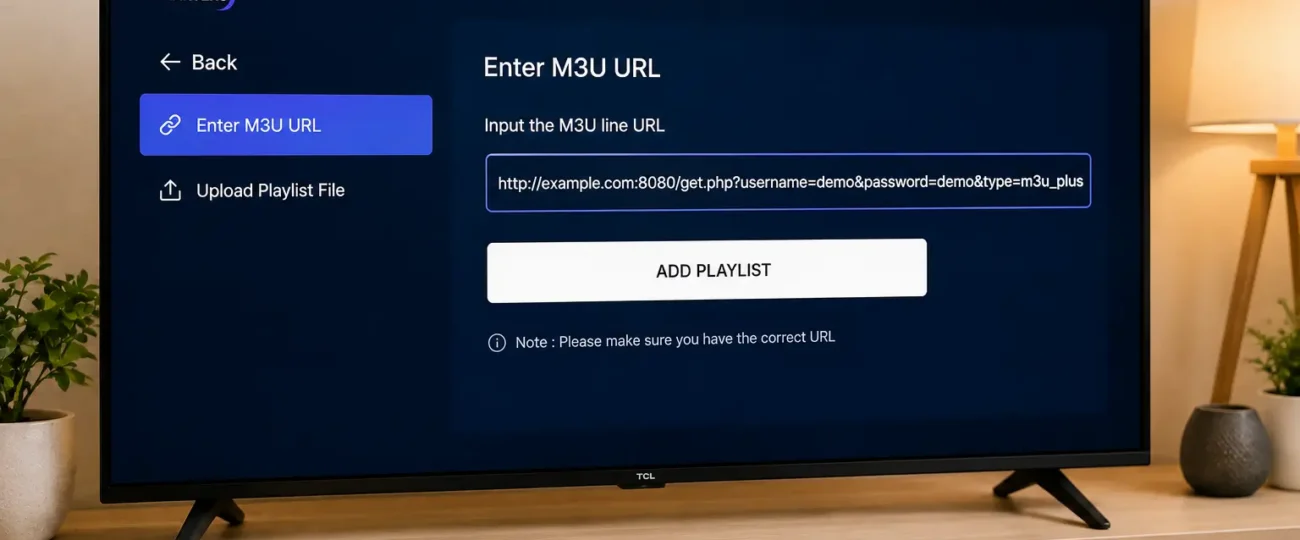
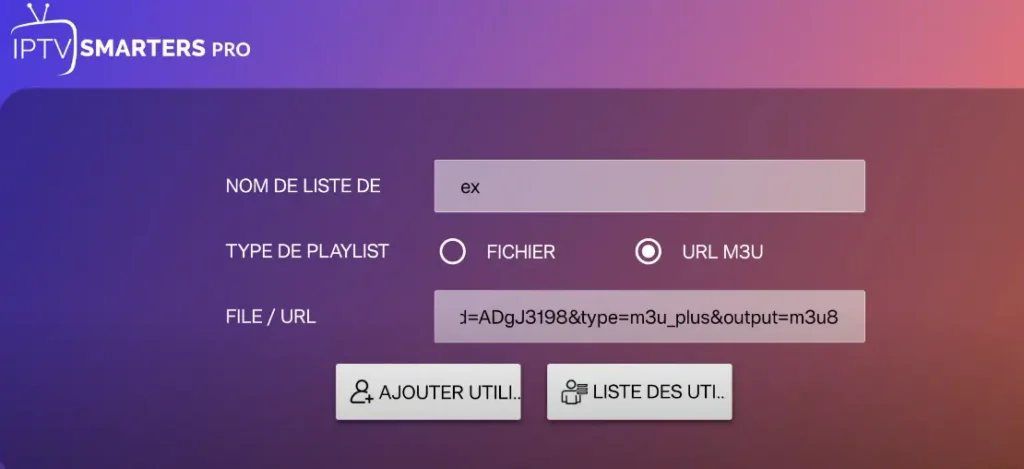
Using an M3U file with an IPTV app is straightforward once you know where to look. Most modern players accept either an M3U URL (preferred, since it auto-updates when the provider rotates servers) or a downloaded M3U file. Here’s the general process across the most popular IPTV players:
If channels fail to load, the issue is almost always a typo in the URL, an expired link, or your provider’s server being temporarily down, not a problem with the M3U format itself.
M3U is universal and easy to use, but it has real limitations compared to newer formats like Xtream Codes API. M3U URLs are static, meaning if your provider rotates server addresses, your playlist breaks until you manually update the link.
Xtream Codes, on the other hand, authenticates via a username and password combination, automatically reconnecting to the latest server without user intervention.
Xtream Codes also provides better EPG integration, organized VOD libraries, and catch-up TV functionality, features that basic M3U files struggle to deliver consistently.
For most subscribers, the recommendation is simple: use Xtream Codes when available, and fall back to M3U only when your player or provider doesn’t support the newer protocol.
The M3U format itself is rarely the cause of streaming problems, the quality of the servers behind it makes the real difference. A reliable IPTV provider with redundant Canadian servers, strong infrastructure, and proper encoding delivers smooth playback regardless of whether you’re using an M3U or Xtream Codes connection.
According to Innovation, Science and Economic Development Canada, more than 90% of Canadian households now have access to high-speed internet, meaning the bottleneck for stream quality has shifted from connection speed to provider infrastructure.
A great M3U URL pointing to overloaded servers will buffer endlessly, while a basic playlist pointing to well-maintained infrastructure plays flawlessly even during peak hours.
M3U is the foundational format that makes most IPTV services work, a simple, universally supported playlist file that connects your app to your provider’s stream library. While it remains widely used, its limitations have made Xtream Codes API the preferred choice for users who want auto-updating connections, richer metadata, and better EPG integration. Either format can deliver excellent streaming when paired with the right infrastructure.
The real takeaway? The format you use matters less than the provider behind it. A properly encoded M3U8 file pointing to stable, well-maintained Canadian servers will outperform any premium-format playlist running on overloaded infrastructure.
Choose your IPTV provider based on server quality, redundancy, and customer support, and the playlist format becomes a minor technical detail rather than a daily frustration.
No. M3U is just the playlist file format that delivers channel lists to IPTV apps. IPTV is the broader technology that streams TV content over the internet.
Yes. M3U files are plain text and can be created in any text editor. However, you still need access to valid stream URLs, which typically come from a licensed IPTV provider.
The most common causes are an expired link, a typo in the URL, or your provider’s server being temporarily down. Always verify the URL by pasting it into a browser to test.
Popular options include TiviMate, IPTV Smarters Pro, XCIPTV, GSE Smart IPTV, and VLC Media Player. Each handles M3U slightly differently, but all support the format natively.
The format itself is fully legal. What matters is the source of the streams in the playlist, accessing licensed content is legal, while unlicensed playlists fall under copyright infringement.
Yes, as long as your Smart TV has a compatible IPTV app installed. Built-in players on most Smart TVs don’t support M3U directly, so a dedicated app is required.
Xtream Codes is the better choice when available, it auto-updates, supports richer metadata, and handles EPG more reliably. Use M3U only when Xtream Codes isn’t supported.

Premium IPTV subscription built for Canadian viewers