

 Written by Rana
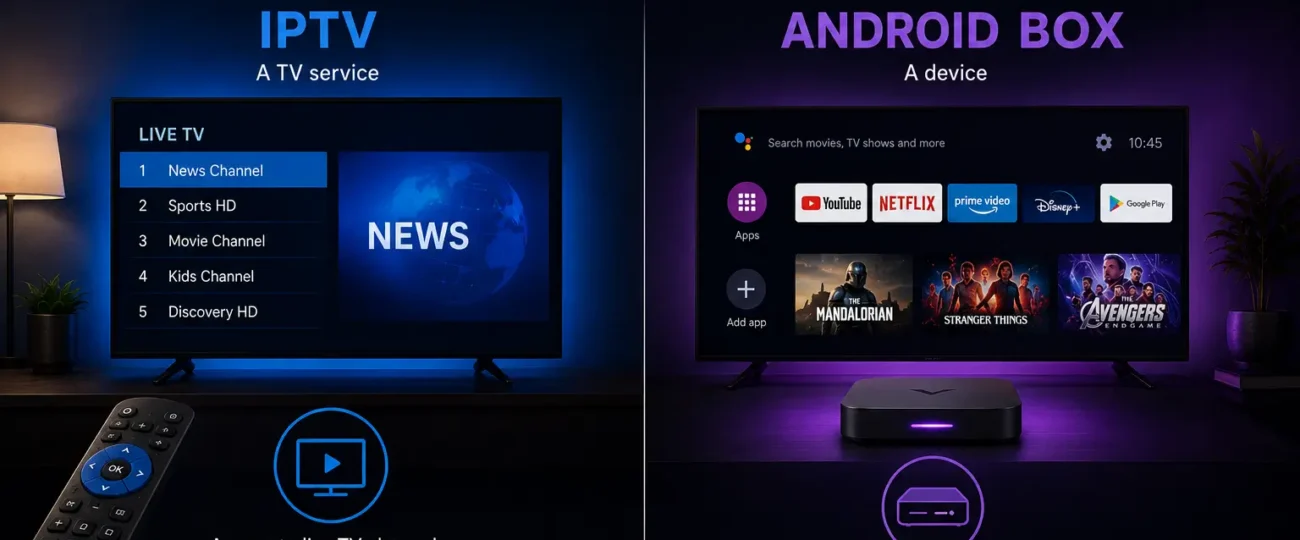
The main difference is simple: IPTV is a service that delivers television channels and on-demand content over the internet, while an Android Box is a physical device that connects to your TV and runs apps, including IPTV apps. They are not competitors; IPTV is the content delivery method, and the Android Box is one of the devices you can use to watch it.
In other words, one answers “what am I watching,” and the other answers “what am I watching it on” Many people confuse the two because they are often bought and used together, but they solve completely different parts of the same setup.
With a reliable subscription, from a trusted provider like IPTV Canada, you can stream on an Android Box, a Smart TV, a phone, or a computer, the choice of device is entirely yours. This clear guide explains exactly what each one is, how they relate, and which you actually need.
The table below summarizes the key differences at a glance, so you can see immediately why these two are not in competition:
| Aspect | IPTV | Android Box |
| What it is | A service / delivery technology | A physical hardware device |
| Main role | Provides channels and content | Runs apps to display content |
| Includes channels? | Yes, via your subscription | No, needs a service |
| Works alone? | Yes, on many devices | Yes, but limited without a service |
| Replaces the other? | No | No |
| Typical cost | Recurring subscription | One-time device purchase |
| Best use | Streaming live TV and VOD | Upgrading any TV to smart features |
Here is a simple way to remember how they fit together:
In short, you are never really choosing between an IPTV and an Android Box, you are deciding whether your existing screen can already run the service, or whether it needs a small device to do so.
The core difference is that IPTV is a service while an Android Box is hardware. IPTV (Internet Protocol Television) is the technology that streams live channels and movies to you over an internet connection instead of cable or satellite.
An Android Box is a small device that plugs into your TV’s HDMI port and runs apps, much like a smartphone for your television.
One delivers the content; the other is a tool to display it. Comparing them directly is like comparing electricity to a lamp, they belong to different categories but work best together. Understanding this distinction makes every other decision about your setup much clearer, because you stop seeing them as alternatives and start seeing them as partners.
IPTV is a method of delivering television content through the internet rather than through traditional cable lines or a satellite dish. When you subscribe to an IPTV service, you receive login details or a playlist that you enter into a compatible app. The app then streams live channels, sports, series, and on-demand movies directly to your screen in HD or 4K.
IPTV is not a device and not an app by itself; it is the underlying service and delivery system that everything else depends on. It can run on almost any internet-connected screen, which is exactly why it is so flexible and popular compared with older, fixed TV systems that lock you to one box.
An Android Box is a streaming device that runs the Android operating system and connects to your television through an HDMI port. It instantly turns any regular or older TV into a smart TV, letting you install apps, browse the internet, and stream content.
The box itself does not include any channels or subscriptions; it only provides the platform to run apps, similar to how a phone needs apps to be useful.
You still need a service, such as IPTV, to actually watch live TV on it. Many of these devices run Android TV, Google’s TV version of Android, which is optimized for the big screen and a remote. Think of the Android Box as an empty toolbox: useful, but only once you add the right tools, like an IPTV app and a subscription.
Yes, you can use IPTV without an Android Box, because IPTV works on many different devices. A Smart TV, a phone, a tablet, a computer, or a streaming stick can all run an IPTV app and play your subscription without any extra hardware. The Android Box is just one convenient option among many, not a requirement at all.
People often choose it because it is affordable and instantly upgrades an older television that has no built-in apps. So while the two pair well together, IPTV is in no way dependent on owning an Android Box specifically, and you should pick the device that best fits the screens you already have.
Yes, an Android Box works perfectly fine without IPTV, since it is a general-purpose streaming device. It can run many types of apps, browse the web, play casual games, and handle other forms of online content beyond live TV. IPTV is just one of the things it can do, not its only purpose or its main reason to exist.
Without any streaming service installed, however, the box has limited entertainment value for live television specifically. This is why many users pair an Android Box with an IPTV subscription, together they cover both the hardware side and the content side of a complete home entertainment setup.
For many households, yes, IPTV and an Android Box make an excellent combination. The Android Box provides a powerful, flexible platform, and IPTV provides the channels and on-demand library to fill it with content. You install an IPTV player app on the box, enter your subscription details, and start watching on the big screen within minutes.
This pairing is popular because it is far cheaper than cable, works on older televisions without smart features, and supports a wide range of apps. It also gives you the freedom to change providers or apps later without buying new hardware. To learn how this compares with traditional television, see our guide on whether IPTV is better than cable TV in Canada.
What you need depends on the screens and equipment you already own at home. If you have a modern Smart TV, you may only need an IPTV subscription, since the TV can run the app directly without extra hardware. If you have an older TV with no smart features, an Android Box plus an IPTV subscription gives you a complete, low-cost setup.
In almost every case, the IPTV service is the essential part, because it provides the actual content you want to watch. The Android Box is optional hardware that becomes valuable only when paired with a service like IPTV, so the service should always be your first decision.
No. IPTV is a streaming service delivered over the internet, while an Android Box is a hardware device that runs apps, including IPTV apps. They belong to completely different categories.
No. IPTV works on Smart TVs, phones, tablets, computers, and streaming sticks. An Android Box is just one convenient option, especially for older TVs.
No. The box only provides the platform and apps. You need an IPTV subscription or another service to access live channels and on-demand content.
They are different types of cost. An Android Box is usually a one-time purchase, while IPTV is a recurring subscription. Many households end up using both together.
Yes. Most Smart TVs can install an IPTV app directly, so an Android Box is not required if your TV already supports apps and a stable connection.
Because the box upgrades any TV and runs the IPTV app, while IPTV supplies the channels. Together they replace cable affordably and flexibly.
Start with the IPTV subscription, since it provides the content. Add an Android Box only if your current TV cannot run apps on its own.
The difference between IPTV and an Android Box comes down to service versus hardware: IPTV delivers the channels and content over the internet, while an Android Box is a device that runs the apps to display it. They are not rivals and never replace each other, instead, they often work together to create a flexible, affordable alternative to cable television.
If you already own a Smart TV, an IPTV subscription alone may be enough to get started. If your TV is older, combining it with an Android Box gives you a complete setup at a low one-time cost. Either way, the service is what truly powers your viewing experience, so choose your IPTV provider carefully and the hardware second.

Premium IPTV subscription built for Canadian viewers