

 Written by Rana
Yes, IPTV works without Wi-Fi, because what IPTV actually needs is an internet connection, and Wi-Fi is only one of several ways to provide one.
You can run IPTV over a wired Ethernet cable, over mobile data on a phone or tablet, or through a mobile hotspot that shares your phone’s connection with a TV or box. The common confusion is treating “Wi-Fi” and “the internet” as the same thing; they are not.
Wi-Fi is simply the wireless link between your device and your router, while the internet is the service that delivers your channels. Once you understand that difference, it’s easy to enjoy a reliable IPTV Canada service even when Wi-Fi isn’t available or isn’t the best option. This guide explains every way to connect, which method is most stable, and how to set up IPTV without home Wi-Fi.
IPTV works perfectly well without Wi-Fi, as long as the device has some other path to the internet. Wi-Fi is convenient, but it isn’t a requirement, it’s just the most common way people connect at home. If your TV box, phone, or computer can reach the internet through a cable, a cellular signal, or a shared hotspot, your channels will play exactly the same.
The picture quality and reliability depend on the connection’s speed and stability, not on whether it happens to be wireless. So if your router’s Wi-Fi is patchy, or you’re somewhere without it, you still have several solid options. The only true requirement is an active internet connection of some kind feeding the device.
Wi-Fi and an internet connection are two different things, and understanding that is the key to this whole topic. The internet is the service that comes into your home from your provider and carries your IPTV channels. Wi-Fi is simply the wireless bridge that lets your devices reach your router without a cable.
You can have Wi-Fi with no internet (your router is on but the service is down) and internet with no Wi-Fi (a device plugged in by cable). For IPTV, only the internet part is essential. Wi-Fi is just one delivery method among several, which is why “no Wi-Fi” almost never means “no IPTV.” It simply means you connect another way.
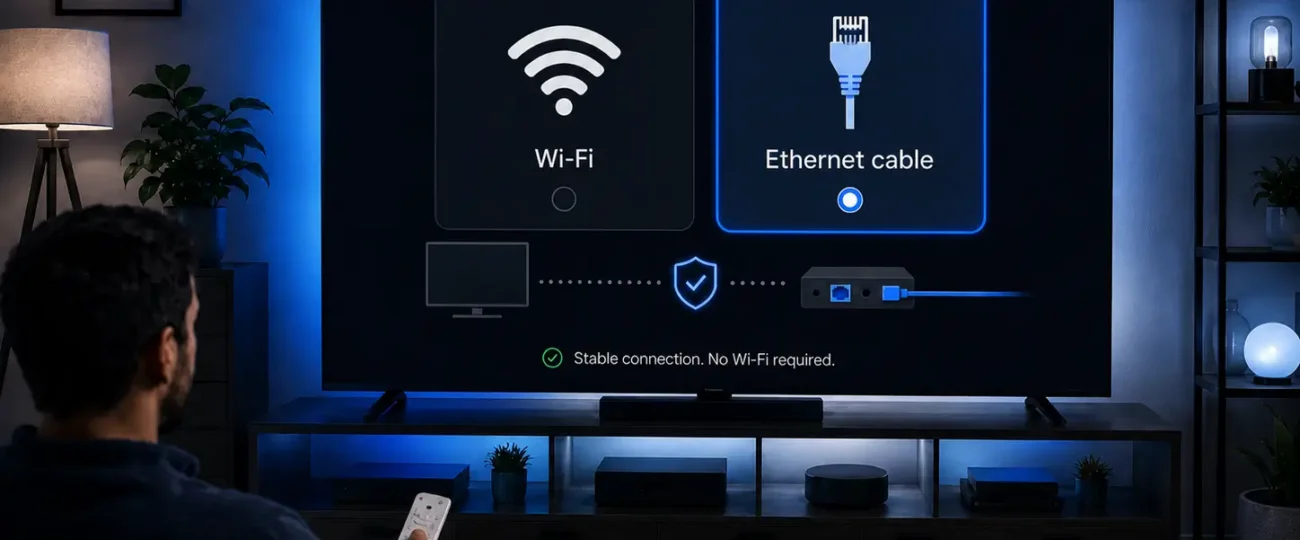
Yes, a wired Ethernet connection is not only possible for IPTV but often the best choice. Plugging your TV box or smart TV directly into the router with a cable gives you a steady, interference-free link that Wi-Fi can’t always match.
This is especially valuable for Full HD and 4K, where a stable connection prevents buffering and quality drops. Most IPTV boxes, smart TVs, and computers have an Ethernet port, so the setup is usually as simple as connecting one cable. If your device sits near the router, wired is the easy winner. If it’s far away, a longer cable or a small network switch in that room can still make it work neatly.
Yes, you can watch IPTV over mobile data using a 4G or 5G connection on a phone or tablet. As long as you have a usable cellular signal and an IPTV app installed, your channels stream just like they would on home internet. Modern 5G in particular offers more than enough speed for HD and even 4K viewing.
The main thing to watch is your data allowance: video uses a lot of data, so streaming for hours on a capped mobile plan can add up quickly. For occasional viewing on the go it’s perfectly practical, but for daily watching, an unlimited mobile plan or a Wi-Fi/wired connection at home is more economical.
Yes, a mobile hotspot lets you run IPTV on a TV or box by sharing your phone’s internet connection. When you enable the hotspot feature, your phone broadcasts its cellular data as a small wireless network that other devices can join, or you can tether by cable.
This is a great backup when home internet is down or unavailable, such as at a cottage or during a move. The same data caution applies, since all that streaming draws from your phone’s data plan. For the best results, keep the phone close to the device, ensure a strong signal, and use HD rather than 4K to keep data use reasonable while still enjoying a clear picture.
Yes, IPTV works on public Wi-Fi and in other locations, though there are a couple of things to keep in mind. Hotel, café, and airport networks can carry your channels fine, but they’re often slower and shared by many users, so quality may dip during busy times. More importantly, public networks are open and less secure, which means your login details and activity can be exposed.
For that reason, using protection like a VPN on untrusted networks is wise; our guide on whether you need a VPN for IPTV covers this in detail. Away from home, a strong public connection or your own hotspot both let you keep watching.
There are several reliable alternatives to Wi-Fi for getting your IPTV device online, each suited to a different situation. The right one depends on where your device sits and what’s available. The table below compares the main options at a glance.
| Connection method | How it works | Best for | Watch out for |
| Wired Ethernet | Cable from router to device | Stable HD/4K viewing | Need a cable run |
| Powerline adapter | Sends data over home wiring | Rooms far from router | Wiring quality varies |
| MoCA adapter | Uses existing coax (TV) cabling | Homes wired for cable | Needs coax outlets |
| Mobile hotspot | Phone shares cellular data | Backup / no home internet | Uses mobile data |
| Mobile data (4G/5G) | Cellular signal on device | Watching on the go | Data caps |
For most homes, Ethernet or a powerline adapter offers the steadiest experience, while hotspots and mobile data are the best portable choices.
No, IPTV cannot work with no internet connection whatsoever, this is the one real limit. Because IPTV delivers television as data streamed over the internet, it always needs an active connection of some kind to pull in the channels.
Without any internet at all no Wi-Fi, no cable, no cellular signal there’s simply nothing to carry the stream, and the app will sit there unable to load. This is different from traditional antenna or satellite TV, which receive broadcasts through the air. The takeaway is reassuring, though: you don’t need Wi-Fi specifically, you just need some path to the internet, and there are many of those to choose from.
A wired Ethernet connection is the best choice for stable, buffer-free IPTV, with a strong modern Wi-Fi signal a close second. Wired connections avoid the interference, walls, and congestion that can disrupt wireless signals, so the data flows steadily even during long 4K sessions.
A Canadian home-networking guide from PrimeCables walks through why a wired connection still wins on speed and stability, with real-world measurements. If running a cable isn’t practical, position your device near the router on the 5 GHz band, or use a powerline adapter.
The goal is a consistent connection: buffering almost always comes from an unstable or overloaded link rather than from the IPTV service itself.
Setting up IPTV without home Wi-Fi is straightforward once you pick your connection method. The steps are nearly identical to a normal setup, only the way you get online changes. Here’s a simple path to follow:
Once connected, everything works the same as it would over Wi-Fi, with the same channels and features.
No, IPTV does not need Wi-Fi specifically, it needs an internet connection, and Wi-Fi is just one way to provide that. People often use the words interchangeably, but they’re different: the internet is the service that carries your channels, while Wi-Fi is only the wireless link between your device and the router.
You can feed IPTV through a wired Ethernet cable, through mobile data on a phone or tablet, or through a shared mobile hotspot, and it will play exactly the same. So if your Wi-Fi is weak, down, or simply unavailable, you have several practical alternatives that work just as well, and sometimes better.
In most cases, yes — wired Ethernet tends to give a more stable IPTV experience than Wi-Fi. A cable provides a direct, interference-free path to the router, which means fewer dropouts and less buffering, especially when you’re watching in Full HD or 4K. Wi-Fi has to contend with walls, distance, and competing devices, all of which can cause the signal to fluctuate.
That said, a strong, modern Wi-Fi connection on the 5 GHz band is perfectly capable of smooth playback for most viewers. The general rule is simple: if your device stays in one place near the router, choose Ethernet; if it needs to move around, good Wi-Fi is fine.
IPTV uses a significant amount of mobile data, so it’s worth planning ahead if you’re streaming over a cellular connection. As a rough guide, expect around 1 GB per hour in standard definition, roughly 1.5 to 3 GB per hour in HD, and 7 GB or more per hour in 4K.
That means a single evening of HD viewing can use several gigabytes, and daily watching can quickly exhaust a capped plan. If you mainly watch over mobile data or a hotspot, choosing a lower resolution like HD instead of 4K is the easiest way to stretch your allowance, and an unlimited mobile plan removes the worry entirely.
Yes, you can watch IPTV while traveling, as long as the device you’re using has a working internet connection. In a car or on the road, that usually means mobile data on a phone or tablet, or a mobile hotspot shared to another device.
A strong 4G or 5G signal is generally enough for smooth HD playback, though coverage can vary in rural areas or while moving at speed. Keep an eye on your data usage, since video consumes a lot over cellular. For passengers on a long trip it’s a great way to stay entertained, but the driver should never stream while driving.
Yes — if your home Wi-Fi goes down but you still have mobile data, IPTV will keep working through that cellular connection. The simplest approach is to switch your phone or tablet to mobile data and watch directly on it, or to turn on your phone’s hotspot and connect your TV, box, or computer to that.
This makes mobile data an excellent backup during an internet outage, so you don’t miss live events. Just remember that everything you stream then draws from your mobile plan, so it’s wise to lower the quality to HD and keep an eye on your data while your main connection is restored.
No, you don’t need Wi-Fi to set up an IPTV box — you only need a way for it to reach the internet during setup. The most reliable option is to plug the box into your router with an Ethernet cable, which often makes setup faster and steadier than wireless. Alternatively, you can connect the box to a mobile hotspot if no home network is available.
Once the box is online, you simply enter your subscription details and load your channels, exactly as you would over Wi-Fi. The setup process itself doesn’t care which connection type you use, as long as the box can get online.
Watching IPTV on public Wi-Fi is possible, but it comes with security considerations worth taking seriously. Open networks in hotels, cafés, and airports are shared and usually unencrypted, which means others on the same network could potentially intercept your login details or monitor your activity.
They also tend to be slower and more crowded, so playback quality can suffer at peak times. To stay safe, avoid entering sensitive information, and consider using a VPN to encrypt your connection on untrusted networks. With those precautions in place, public Wi-Fi can be a convenient way to keep watching while you’re away from home.
The short answer is that IPTV does not need Wi-Fi, it needs the internet, and Wi-Fi is just one of many ways to deliver it. A wired Ethernet cable is the most stable option and the best defense against buffering, while mobile data and a phone hotspot make great portable or backup connections when home Wi-Fi isn’t around.
The only real requirement is some active path to the internet; with none at all, no streaming service can load. So whether you’re plugging in a cable, sharing your phone’s data, or connecting on the go, you can keep enjoying your channels. Match your connection to your situation, lean toward wired for the steadiest picture, and Wi-Fi becomes just one convenient choice rather than a necessity.

Premium IPTV subscription built for Canadian viewers