How to Login to IPTV Smarters Player ?
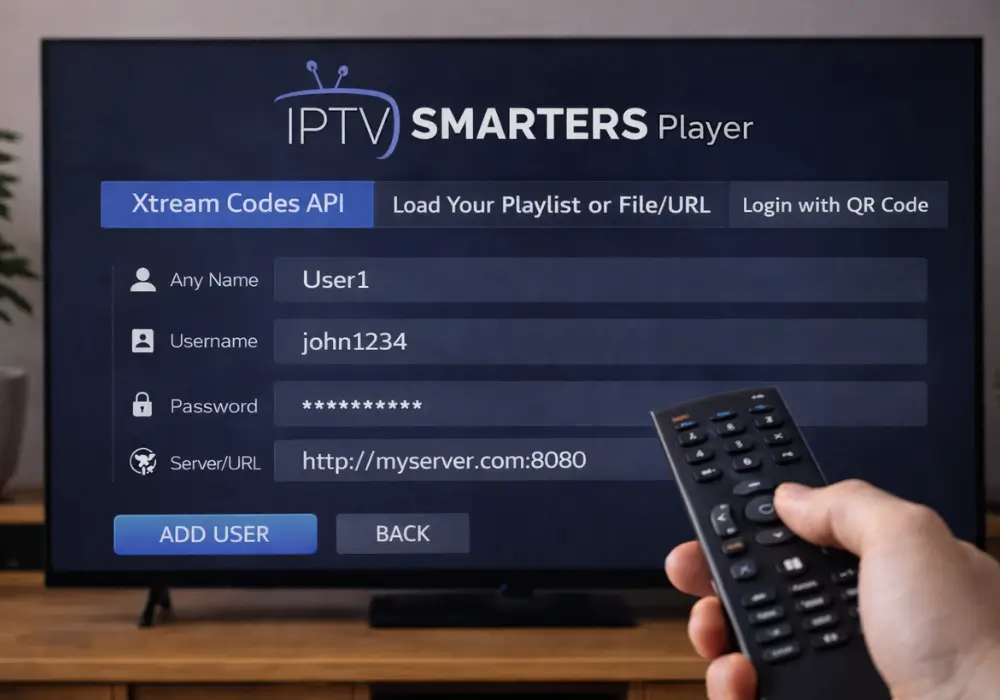
To log in to IPTV Smarters Player, open the app and tap “Load Playlist or File/URL.” If you’re using Xtream Codes API, enter your server URL, username, and password, then tap “Add User.”
For M3U login, select “Login with M3U URL,” enter a profile name, and paste your complete playlist URL. Your channels will load automatically once connected. Below, you’ll find platform-specific instructions and troubleshooting tips.
1. Install and Open IPTV Smarters Player
- Download IPTV Smarters Player from the official app store (Android, iOS, Smart TV, or PC).
- Install the application and wait for completion.
- Open the app from your device menu.
- Accept the Terms of Use if prompted.
- Allow required permissions (storage or network access).
2. Choose the Login Method
- On the home screen, select “Login with Xtream Codes API.”
- Alternatively choose “Load Your Playlist or File/URL.”
- Some providers also offer “Login with QR Code.”
- Confirm which method your IPTV provider supports.
- Tap Add User or Continue.
3. Enter Your IPTV Credentials
- Input the Username provided by your IPTV subscription.
- Enter the Password exactly as given.
- Add the Server / Portal URL (for Xtream Codes).
- If using M3U, paste the M3U Playlist URL.
- Double-check spelling to avoid login errors.
4. Load Channels and Content
- Press Login / Add User.
- Wait while the app downloads channel lists and VOD data.
- Do not close the app during loading.
- Once finished, you will see Live TV, Movies, and Series sections.
- Select a category to start streaming.
5. Optimize and Troubleshoot Login
- Ensure a stable internet connection (preferably Wi-Fi 5 GHz or Ethernet).
- Clear app cache if channels fail to load.
- Update IPTV Smarters to the latest version.
- Re-enter credentials if you receive authentication errors.
- Contact your IPTV provider if the server URL is not working.
Frequently Asked Questions
Why Can’t I Login to IPTV Smarters?
You can’t login due to credential mismatch, network errors, server downtime, subscription expiry, geo restrictions, or app corruption. Check your credentials, verify your subscription’s active, confirm server status, disable VPN, and reinstall the app.
How Do You Log Into IPTV?
Open IPTV Smarters, select your login method, then enter your remote authentication credentials. You’ll manage playlist management settings, verify device compatibility, and set user permissions. Following current IPTV trends, prioritize streaming security throughout setup.
How to Create IPTV Login Details?
To create IPTV login details, you’ll sign up with your provider, who’ll generate authentication tokens and credentials storage for your account. They’ll configure user permissions, session timeout settings, playlist management access, and IPTV security protocols for your subscription.
How to Create an Account on IPTV Smarters?
You don’t create an account directly on IPTV Smarters. Subscribe to an IPTV provider first, then enter their credentials into the app’s user interface to access features like parental controls, multi screen viewing, and profile customization.